
 Hyundai Veloster: Front Stabilizer Bar. Repair procedures
Hyundai Veloster 2011-2017 Service Manual / Suspension System / Front Suspension System / Front Stabilizer Bar. Repair procedures
Hyundai Veloster: Front Stabilizer Bar. Repair procedures
Hyundai Veloster 2011-2017 Service Manual / Suspension System / Front Suspension System / Front Stabilizer Bar. Repair procedures
Hyundai Veloster 2011-2017 Service Manual / Suspension System / Front Suspension System / Front Stabilizer Bar. Repair procedures
Replacement
| 1. |
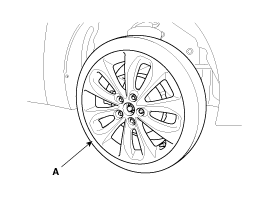
Remove the front wheel & tire.
|

| 2. |
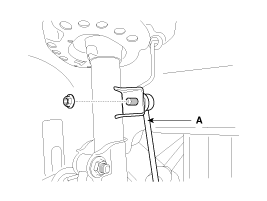
Disconnect the stabilizer link with the front strut assembly after
loosening the nut.
|
| 3. |
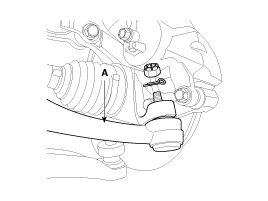
Loosen the nut and then remove the tie-rod end (A) with the front
axle.
|
| 4. |
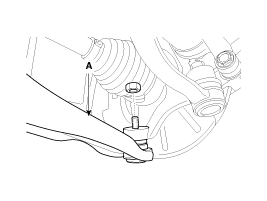
Loosen the nut and then remove the lower arm (A).
|
| 5. |
Loosen the bolt (A) and then disconnect the universal joint assembly
from the pinion of the steering gear box.
|
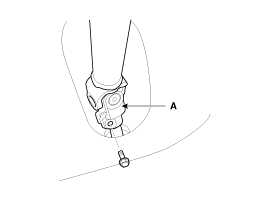
| 6. |
Remove the rubber hanger (A).
|
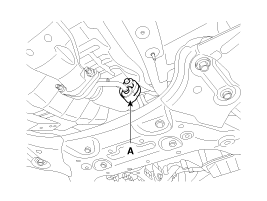
| 7. |
Loosen the roll rod (A) mounting bolts and nuts.
|
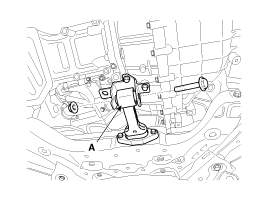
| 8. |
Loosen the bolts & nuts and then remove the front sub frame (A).
|
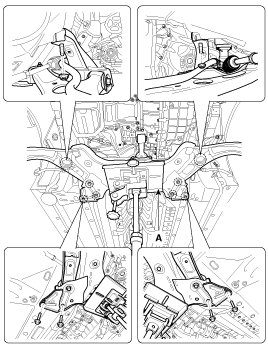
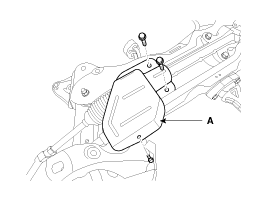
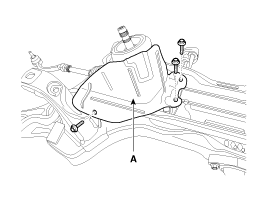
| 9. |
Remove the protecter (A).
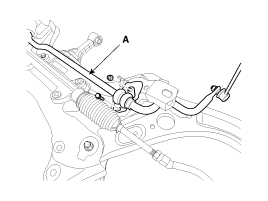
[LHD]
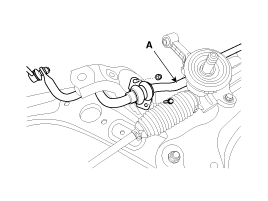
[RHD]
|
| 10. |
Remove the stabilizer (A) from the front sub frame by loosening
the mounting bolts & nuts.
|
| 11. |
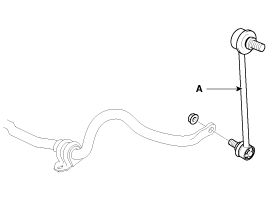
Disconnect the stabilizer link (A) with the stabilizer bar by
loosening the nut.
|
| 12. |
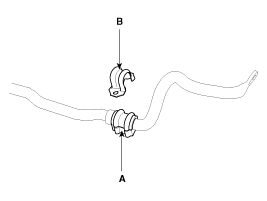
Remove the bushing (A) and the clamp (B) from the stabilizer bar.
|
| 13. |
Installation is the reverse of removal.
|
| 14. |
Check the wheel alignment.
(Refer to SS group - "Tires/Wheels")
|
Inspection
| 1. |
Check the bushing for wear and deterioration.
|
| 2. |
Check the front stabilizer bar for deformation.
|
| 3. |
Check the front stabilizer link ball joint for damage.
|
 Front Lower Arm. Repair procedures
Replacement
1.
Remove the front wheel & tire.
Tightening torque :
88.3 ~ 107.9N.m(9.0 ~ 11.0kgf.m, 65.1 ~ 79.6lb-ft)
...
 Sub Frame. Repair procedures
Replacement
1.
Remove the front wheel & tire.
Tightening torque :
88.3 ~ 107.9N.m(9.0 ~ 11.0kgf.m, 65.1 ~ 79.6lb-ft)
...
See also:
Front Body. Body Repair
Front Body A
Hood hinge mounting hole (Ø10)
Fender apron upper member corner
Front shock ...
Vehicle stability management (VSM)
This system provides further enhancements to vehicle stability and steering responses
when a vehicle is driving on a slippery road or a vehicle detected changes in coefficient
of friction between ...
Front Impact Sensor (FIS). Repair procedures
Removal
•
Removal of the airbag must be performed according to the
precautions/ procedures d ...
Categories
- Hyundai Veloster Manuals Home
- Hyundai Veloster 2010-2017 Owner's Manual
- Hyundai Veloster 2010-2017 Service Manual

© 2011-2026 Copyright www.hvmanual.com