
 Hyundai Veloster: Repair procedures
Hyundai Veloster 2011-2017 Service Manual / Body Electrical System / Multifunction switch / Repair procedures
Hyundai Veloster: Repair procedures
Hyundai Veloster 2011-2017 Service Manual / Body Electrical System / Multifunction switch / Repair procedures
Inspection
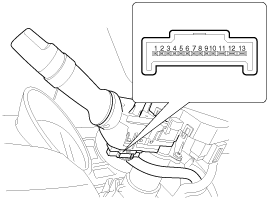
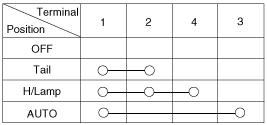
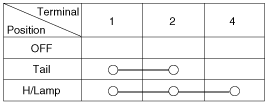
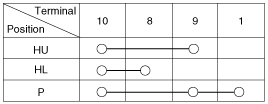
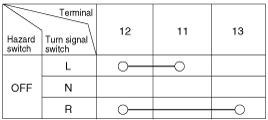
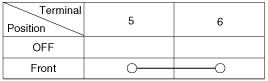
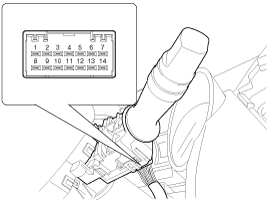
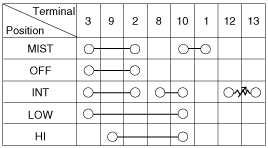
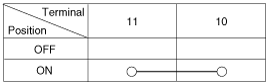
Inspection (With GDS)
| 1. |
Check BCM input/output specification of multifunction switch using
the GDS. If the specification is abnormal, replace the lamp or wiper
switch.
|
| 2. |
If diagnosis is required on the multifunction switch, select model
and "BCM".
|
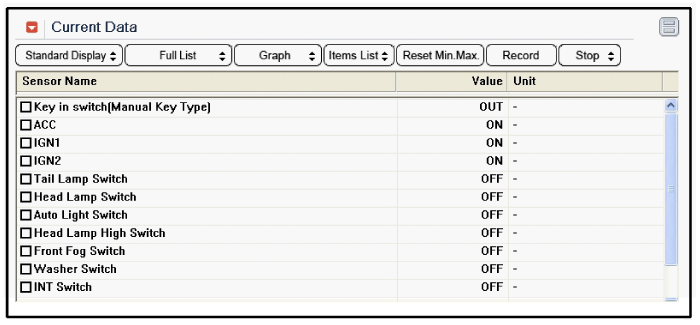
| 3. |
To consult the present input/output value of BCM, "Current DATA".
It provides information of BCM input/output conditions of power supply,
turn signal/brake lamp, headlamp, door, locks, outside mirror, wiper,
auto-light and transmitters etc.
|
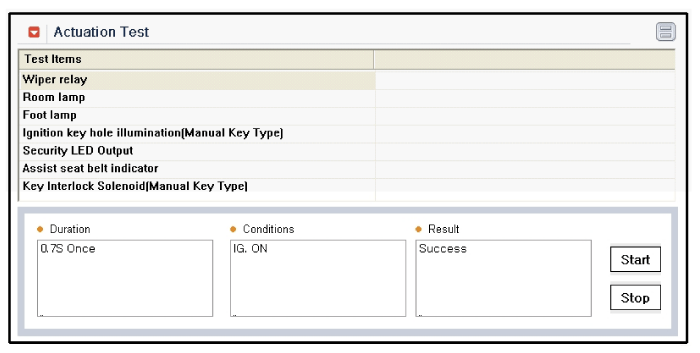
| 4. |
To perform compulsory operation on BCM input factors, select "ACTUATION
TEST".
|
Removal
| 1. |
Disconnect the negative (-) battery terminal.
|
| 2. |
Remove the steering wheel.
(Refer to the ST group - "Steering column & shaft")
|
| 3. |
Remove the steering column upper and lower shrouds.
|
| 4. |
Remove the clock spring.
|
| 5. |
Disconnect the lighting switch connector and wiper & washer switch
connector.
|
| 6. |
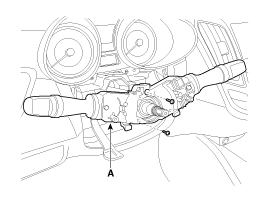
Remove the multifunction switch assembly(A) with loosening 2 screws.
|
| 7. |
If it is necessary to remove. The wiper & washer switch only,
release the lock of wiper switch using tool without removing the steering
wheel and the clock spring.
|
Installation
| 1. |
Install the multifunction switch.
|
| 2. |
Install the clock spring.
|
| 3. |
Install the steering column upper and lower shrouds.
|
| 4. |
Install the steering wheel.
|

 Components and Components Location
Components(1)
Connector name
No
Descripton
Connector name
No
RH SIDE
Lighting
(13 pin)
-LH side
...
 Horn
Horn
...
See also:
Filler-Neck Assembly. Repair procedures
Removal
1.
Open the fuel filler door, and then remove the filler-neck assembly
mounting screws (A).
2.
Disconnect the fuel filler ...
Tire and loading information label
The label located on the driver's door sill gives the original tire size, cold
tire pressures recommended for your vehicle, the number of people that can be in
your vehicle and vehicle capac ...
Front Driveshaft. Repair procedures
Replacement
1.
Loosen the wheel nuts slightly.
Raise the vehicle, and make sure it is securely supported.
2.
Remove the front wheel and ...
Categories
- Hyundai Veloster Manuals Home
- Hyundai Veloster 2010-2017 Owner's Manual
- Hyundai Veloster 2010-2017 Service Manual
