
 Hyundai Veloster: Hazard warning flasher
Hyundai Veloster 2011-2017 Owner's Manual / Features of your vehicle / Hazard warning flasher
Hyundai Veloster: Hazard warning flasher
Hyundai Veloster 2011-2017 Owner's Manual / Features of your vehicle / Hazard warning flasher
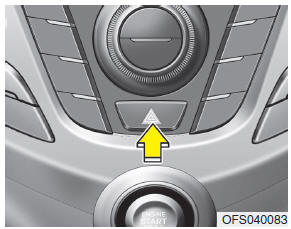
The hazard warning flasher should be used whenever you find it necessary to stop the car in a hazardous location. When you must make such an emergency stop, always pull off the road as far as possible.
The hazard warning lights are turned on by pushing in the hazard switch. This causes all turn signal lights to blink. The hazard warning lights will operate even though the key is not in the ignition switch.
To turn the hazard warning lights off, push the switch a second time.
 Rear view camera
The rearview camera will activate when the back-up light is ON with the ignition
switch ON and the shift lever in the R position.
This system is a supplemental system that shows behind the vehicl ...
 Lighting
...
See also:
Parts
When replacing parts, use HYUNDAI genuine parts.
Replacement
Standard values, such as torques and certain adjustments, must be strictly
observed in the reassembly of all parts.
If r ...
Concentric Slave Cylinder Assembly. Repair procedures
Removal
1.
Remove the transaxle assembly.
(Refer to Manual Transaxle System - " Manual Transaxle")
2.
Remove the concentric ...
Input Speed Sensor 1 > Repair procedures
Inspection
Refer to DTC code "P2765, P2766" Input Shaft Speed Sensor.
Removal
1.
Remove the under cover.
2.
Disconnect the inp ...
Categories
- Hyundai Veloster Manuals Home
- Hyundai Veloster 2010-2017 Owner's Manual
- Hyundai Veloster 2010-2017 Service Manual
