
 Hyundai Veloster: Repair procedures
Hyundai Veloster 2011-2017 Service Manual / Body Electrical System / Ignition Switch Assembly / Repair procedures
Hyundai Veloster: Repair procedures
Hyundai Veloster 2011-2017 Service Manual / Body Electrical System / Ignition Switch Assembly / Repair procedures
Hyundai Veloster 2011-2017 Service Manual / Body Electrical System / Ignition Switch Assembly / Repair procedures
Removal
| 1. |
Disconnect the negative (-) battery terminal.
|
| 2. |
Remove the driver crash pad lower panel.
(Refer to the BD group - "Crash pad")
|
| 3. |
Remove the steering column upper and lower shrouds.
(Refer to the BD group - "Crash pad")
|
| 4. |
Remove the wiper switch.
(Refer to the BE group - "Multifunction switch")
|
| 5. |
Remove the ignition switch after disconnecting the ignition switch
6P connector.
|
| 6. |
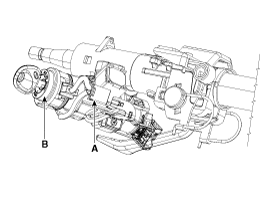
Remove the key warning/immobilizer connector (A).
|
| 7. |
After loosening the screw, remove the key warning switch (B).
|
| 8. |
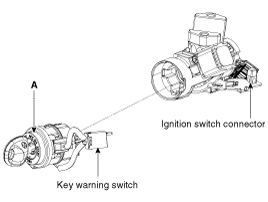
Pushing lock pin with key ACC.
|
| 9. |
Remove the key lock cylinder (A).
|
Installation
| 1. |
Install the key lock cylinder.
|
| 2. |
Install the key warning switch.
|
| 3. |
Install the key warning/immobilizer connector.
|
| 4. |
Connect the ignition switch connector after Install the ignition
switch.
|
| 5. |
Install the wiper switch.
|
| 6. |
Install the steering column shrouds.
|
| 7. |
Install the driver crash pad lower panel.
|
Inspection
| 1. |
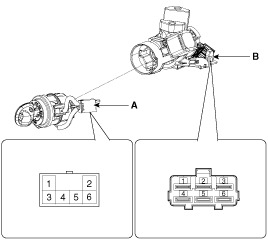
Disconnect the ignition switch connector (B) and key warning switch
connector (A) from the steering column.
|
| 2. |
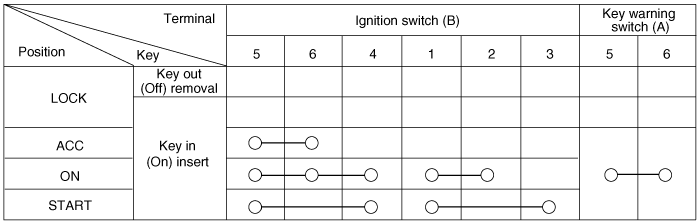
Check for continuity between the terminals.
|
| 3. |
If continuity is not as specified, replace the switch.
|


See also:
Rear parking assist system
The rear parking assist system assists the driver during backward movement of
the vehicle by chiming if any object is sensed within a distance of 120 cm (47 in.)
behind the vehicle. This system ...
Schematic Diagrams
MDPS Circuit Diagram
Harness Connector
Type
Pin NO
Description
Battery
1
Battery +
2
B ...
Side Airbag (SAB) Module. Repair procedures
Removal
The side airbag cannot be disassembled from the seat back assembly,
so replace assembly when replacing the side airba ...
Categories
- Hyundai Veloster Manuals Home
- Hyundai Veloster 2010-2017 Owner's Manual
- Hyundai Veloster 2010-2017 Service Manual

В© 2011-2026 Copyright www.hvmanual.com