
 Hyundai Veloster: Power Door Lock Actuators. Repair procedures
Hyundai Veloster 2011-2017 Service Manual / Body Electrical System / Power Door Locks / Power Door Lock Actuators. Repair procedures
Hyundai Veloster: Power Door Lock Actuators. Repair procedures
Hyundai Veloster 2011-2017 Service Manual / Body Electrical System / Power Door Locks / Power Door Lock Actuators. Repair procedures
Inspection
| 1. |
Remove the front door trim.
(Refer to the BD group - "Front door")
|
| 2. |
Remove the front door module.
|
| 3. |
Disconnect the 7P connector from the actuator.
|
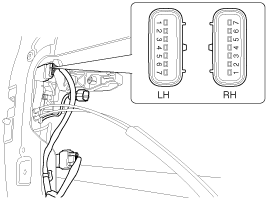
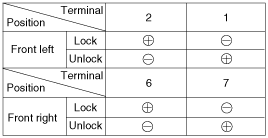
| 4. |
Check actuator operation by connecting power and ground according
to the table. To prevent damage to the actuator, apply battery voltage
only momentarily.
|
| 1. |
Remove the rear door trim.
(Refer to the BD group - "Rear door")
|
| 2. |
Remove the rear door module.
|
| 3. |
Disconnect the 7P connector from the actuator.
|
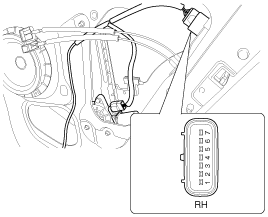
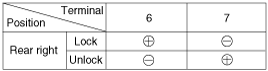
| 4. |
Check actuator operation by connecting power and ground according
to the table. To prevent damage to the actuator, apply battery voltage
only momentarily.
|
| 1. |
Remove the tailgate trim panel.
(Refer to the BD group - "Tailgate")
|
| 2. |
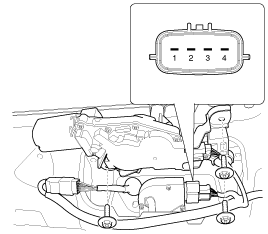
Disconnect the 4P connector from the actuator.
|
| 3. |
Check actuator operation by connecting power and ground according
to the table. To prevent damage to the actuator, apply battery voltage
only momentarily.
|

| 1. |
Remove the front door trim panel.
(Refer to the BD group - "Front door")
|
| 2. |
Remove the front door module.
|
| 3. |
Disconnect the 7P connector from the actuator.
|
| 4. |
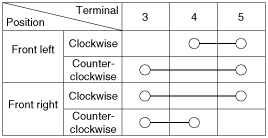
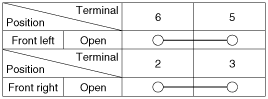
Check for continuity between the terminals in each switch position
when inserting the key into the door according to the table.
|
| 1. |
Remove the rear door trim panel.
(Refer to the BD group - "Rear door")
|
| 2. |
Remove the rear door module.
|
| 3. |
Disconnect the 7P connector from the actuator.
|
| 4. |
Check for continuity between the terminals in each switch position
according to the table.
|

| 1. |
Remove the tailgate trim.
(Refer to the BD group - "Tailgate")
|
| 2. |
Disconnect the 4P connector from the actuator.
|
| 3. |
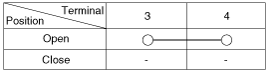
Check for continuity between the terminals in each switch position
according to the table.
|
 Components and Components Location
Component Location
1. Driver power window switch
2. Door lock switch
3. IPM
4. Front door lock actuator
5. Rear door lock actuator
6. Tailgate open actuator
...
 Power Door Lock Switch. Repair procedures
Inspection
Diagnosis With GDS
1.
It will be able to diagnose defects of power door lock with GDS
quickly. GDS can operates actuator forcefully, input/output value moni ...
See also:
Interior light bulb replacement
1. Using a flat-blade screwdriver, gently pry the lens from the interior light
housing. 2. Remove the bulb by pulling it straight out.
WARNING
Prior to working on the Interior Lights, ensure t ...
Components and Components Location
Component Location
1. Start Stop Button(SSB)
2. FOB key
3. Smart key unit
4. Interior antenna 1
5. Interior antenna 2
6. Tailgate antenna
7. Door handle & ...
Accelerator Position Sensor (APS). Repair procedures
Inspection
1.
Connect the GDS on the Data Link Connector (DLC).
2.
Turn the ignition switch ON.
3.
Measure the ...
Categories
- Hyundai Veloster Manuals Home
- Hyundai Veloster 2010-2017 Owner's Manual
- Hyundai Veloster 2010-2017 Service Manual
