
 Hyundai Veloster: Instrument panel illumination
Hyundai Veloster 2011-2017 Owner's Manual / Features of your vehicle / Instrument cluster / Instrument panel illumination
Hyundai Veloster: Instrument panel illumination
Hyundai Veloster 2011-2017 Owner's Manual / Features of your vehicle / Instrument cluster / Instrument panel illumination
Hyundai Veloster 2011-2017 Owner's Manual / Features of your vehicle / Instrument cluster / Instrument panel illumination
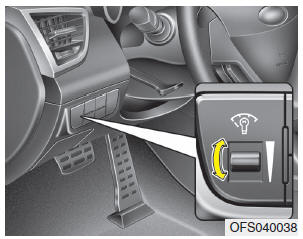
Press the illumination control switch to adjust the instrument panel illumination intensity. For instrument cluster type A, the vehicle’s parking lights or headlights should be on to adjust the instrument panel illumination.
 Instrument cluster
1. Tachometer 2. Turn signal indicators 3. Speedometer 4.Warning and indicator
lights 5. Engine temperature gauge 6. Fuel gauge 7. Odometer/Tripmeter*
* if equipped
❈ The actual cluster i ...
 Gauges
Speedometer
The speedometer indicates the speed of the vehicle.
The speedometer is calibrated in miles per hour and/or kilometers per hour.
Tachometer
The tachometer indicates the approximate ...
See also:
Antenna
Glass antenna (if equipped)
When the radio power switch is turned on while the ignition key is in either
the “ON� or “ACC� position, your car will receive both AM and FM broadcast signals ...
Economical operation
Your vehicle's fuel economy depends mainly on your style of driving, where you
drive and when you drive.
Each of these factors affects how many miles (kilometers) you can get from a
gallon (l ...
Categories
- Hyundai Veloster Manuals Home
- Hyundai Veloster 2010-2017 Owner's Manual
- Hyundai Veloster 2010-2017 Service Manual

© 2011-2026 Copyright www.hvmanual.com