
 Hyundai Veloster: Multimedia Jack. Repair procedures
Hyundai Veloster 2011-2017 Service Manual / Body Electrical System / AVN System / Multimedia Jack. Repair procedures
Hyundai Veloster: Multimedia Jack. Repair procedures
Hyundai Veloster 2011-2017 Service Manual / Body Electrical System / AVN System / Multimedia Jack. Repair procedures
Hyundai Veloster 2011-2017 Service Manual / Body Electrical System / AVN System / Multimedia Jack. Repair procedures
Removal
| 1. |
Remove the floor console assembly.
(Refer to the BD group - "Console")
|
| 2. |
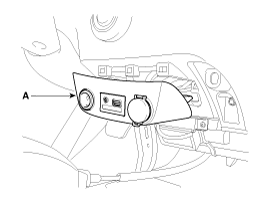
Remove the multimedia jack assembly (A).
|
| 3. |
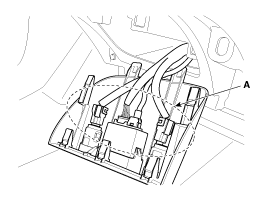
Disconnect the multimidia jack connector (A).
|
| 4. |
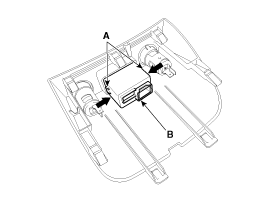
Remove the multimedia jack (B)after releasing the fixed hooks
(A).
|
Installation
| 1. |
Install the multimedia jack.
|
| 2. |
Install the floor console assembly.
|

 Multimedia Jack. Description and Operation
Description
The multimedia jack on the console upper cover is for customers who like
to listen to external portable music players like the MP3, iPod and etc., through
the vehicle's sound ...
 Troubleshooting
Troubleshooting Guide
Before Thinking The Product Has Malfunctioned
1.
Errors which occur during the operation or installation of the
device may be mistaken as a malfu ...
See also:
Brake/clutch fluid
Checking the brake/clutch fluid level
Check the fluid level in the reservoir periodically. The fluid level should be
between MAX and MIN marks on the side of the reservoir.
Before removing the r ...
Lighting control
The light switch has a Headlight and a Parking light position.
To operate the lights, turn the knob at the end of the control lever to one of
the following positions:
(1) OFF position (2) Parkin ...
Clutch Cover And Disc. Components and Components Location
Components
1. Clutch release fork
2. Clutch cover assembly
3. Clutch disk assembly
4. Clutch release bearing
...
Categories
- Hyundai Veloster Manuals Home
- Hyundai Veloster 2010-2017 Owner's Manual
- Hyundai Veloster 2010-2017 Service Manual

В© 2011-2026 Copyright www.hvmanual.com