
 Hyundai Veloster: Lighting control
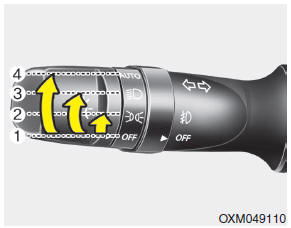
The light switch has a Headlight and a Parking light position.
To operate the lights, turn the knob at the end of the control lever to one of the following positions:
(1) OFF position
(2) Parking light position
(3) Headlight position
(4)
Auto light position (if equipped)
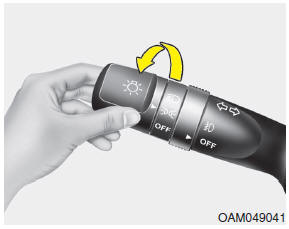
Parking light position ( )
)
When the light switch is in the parking light position, the tail, position and license plate lights will turn on and the tail light indicator will turn on.
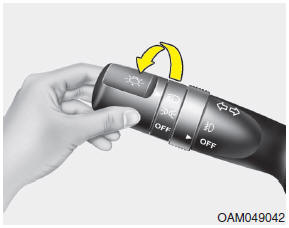
Headlight position ( )
)
When the light switch is in the headlight position the head, tail, license and instrument panel lights will turn on.
✽ NOTICE
The ignition switch must be in the ON position to turn on the headlights.
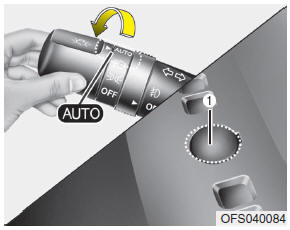
Auto light position
When the light switch is in the AUTO light position, the taillights and headlights will be turned ON or OFF automatically depending on the amount of light outside the vehicle.
CAUTION
- • Never place anything over sensor (1) located on the instrument panel. This will ensure better auto-light system control.
- • Don’t clean the sensor using a window cleaner. The cleaner may leave a light film which could interfere with sensor operation.
- • If your vehicle has window tint or other types of metallic coating on the front windshield, the Auto light system may not work properly.
 Daytime running light
Daytime Running Lights (DRL) can make it easier for others to see the front of
your vehicle during the day. DRL can be helpful in many different driving conditions,
and it is especially helpful af ...
 High beam operation
To turn on the high beam headlights, push the lever away from you. Pull it back
for low beams.
The high beam indicator will light when the headlight high beams are switched
on.
To prevent the ...
See also:
Repair procedures
Removal
Back View Camera
1.
Disconnect the negative(-) battery terminal.
2.
Remove the tailgate outside handle assembly.
(Refer to ...
1. Crankcase emission control system
The positive crankcase ventilation system is employed to prevent air pollution
caused by blow-by gases being emitted from the crankcase. This system supplies fresh
filtered air to the crankcase th ...
Brake Line. Repair procedures
Removal
1.
Disconnect the brake fluid level switch connector, and remove
the reservoir cap.
2.
Remove the brake fluid from the master cyl ...
Categories
- Hyundai Veloster Manuals Home
- Hyundai Veloster 2010-2017 Owner's Manual
- Hyundai Veloster 2010-2017 Service Manual
