
 Hyundai Veloster: Glove box
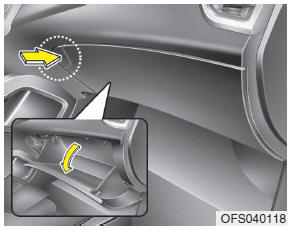
To open the glove box, push the button and the glove box will automatically open. Close the glove box after use.
WARNING
To reduce the risk of injury in an accident or sudden stop, always keep the glove box door closed while driving.
CAUTION
Do not keep food in the glove box for a long time.
 Center console storage
These compartments can be used to store small items required by the driver or
front passenger.
To open the center console storage pull up the lever. ...
 Sunglass holder
To open the sunglass holder, press the cover and the holder will slowly open.
Place your sunglasses in the compartment door with the lenses facing out. Push to
close.
WARNING
• Do not kee ...
See also:
Gear Actuator Motor > Repair procedures
Inspection
1.
Turn off the ignition switch.
2.
Disconnect the gear actuator motor connector.
3.
Measure the ...
Instrument panel illumination
Press the illumination control switch to adjust the instrument panel illumination
intensity. For instrument cluster type A, the vehicle’s parking lights or headlights
should be on to adjust th ...
Rear Wiper Motor. Repair procedures
Inspection
Rear Wiper Motor
1.
Remove the connector from the rear wiper motor.
2.
Connect battery positive (+) and negative (-) cables to t ...
Categories
- Hyundai Veloster Manuals Home
- Hyundai Veloster 2010-2017 Owner's Manual
- Hyundai Veloster 2010-2017 Service Manual
