
 Hyundai Veloster: Instrument panel overview
Hyundai Veloster 2011-2017 Owner's Manual / Your vehicle at a glance / Instrument panel overview
Hyundai Veloster: Instrument panel overview
Hyundai Veloster 2011-2017 Owner's Manual / Your vehicle at a glance / Instrument panel overview
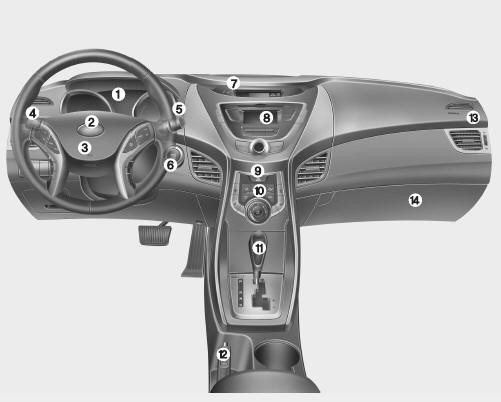
1. Instrument cluster
2. Horn
3. Driver’s front air bag
4. Light control/Turn
signals
5. Wiper/Washer
6. Ignition switch*/ Engine start/stop button
7. Clock
8. Audio*
9. Hazard warning flasher switch
10. Climate control system
11.
Shift lever
12. Parking brake
13. Passenger’s front air bag
14. Glove box
 Interior overview
1. Door lock/unlock button 2. Outside rearview mirror control switch 3. Central
door lock switch 4. Power window lock switch 5. Power window switches 6. Hood
release lever 7. Instrument panel il ...
 Engine compartment
1. Engine oil filler cap 2. Engine oil dipstick 3. Brake/clutch fluid reservoir
4. Positive battery terminal 5. Negative battery terminal 6. Fuse box 7. Air
cleaner 8. Radiator cap 9. Engine coo ...
See also:
Opening the hood
1.Pull the release lever to unlatch the hood. The hood should pop open slightly.
WARNING
Open the hood after turning off the engine on a flat surface, shifting the
shift lever to the P(Park) pos ...
Changing a tire with TPMS
If you have a flat tire, the Low Tire Pressure will come on. Have the flat tire
repaired by an authorized HYUNDAI dealer as soon as possible or replace the flat
tire with the spare tire.
CAUTION
...
Rheostat. Repair procedures
Removal
1.
Disconnect the negative (-) battery terminal.
2.
Remove the crash pad lower switch(A).
(Refer to the BD group - "Crash ...
Categories
- Hyundai Veloster Manuals Home
- Hyundai Veloster 2010-2017 Owner's Manual
- Hyundai Veloster 2010-2017 Service Manual
