
 Hyundai Veloster: MTS Antenna. Repair procedures
Hyundai Veloster 2011-2017 Service Manual / Body Electrical System / MTS System / MTS Antenna. Repair procedures
Hyundai Veloster: MTS Antenna. Repair procedures
Hyundai Veloster 2011-2017 Service Manual / Body Electrical System / MTS System / MTS Antenna. Repair procedures
Hyundai Veloster 2011-2017 Service Manual / Body Electrical System / MTS System / MTS Antenna. Repair procedures
Removal
Roof Antenna (GPS)
| 1. |
Remove the rear roof trim.
(Refer to the BD group - "Roof trim")
|
| 2. |
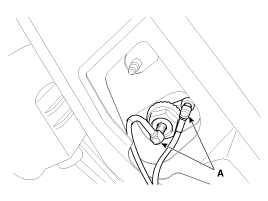
Disconnect the cables (A) from the roof antenna.
|
| 3. |
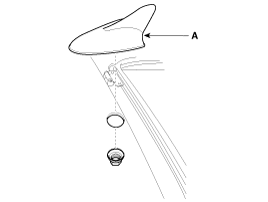
Remove the roof antenna (A) after removing a nut.
|
Installation
Roof Antenna (GPS)
| 1. |
Install the roof antenna.
|
| 2. |
Connect the GPS cable.
|
| 3. |
Install the nut.
|
| 4. |
Install the rear roof trim.
|

 MTS Antenna. Components and Components Location
Components
...
 Smart key System
...
See also:
Repair procedures
Inspection
[System Inspection]
1.
Disconnect the vapor hose from the intake manifold and connect
a vacuum pump to the nipple on the intake manifold.
· At Co ...
Power Seat Motor. Repair procedures
Inspection
Power seat motor
1.
Remove the seat and Lumbar support motor (A) connectors.
2.
With the battery connected dire ...
Fuel Filler Cap. Description and Operation
Description
A ratchet tightening device on the threaded fuel filler cap reduces the
chances of incorrect installation, which seals the fuel filler. After the gasket
on the fuel filler cap an ...
Categories
- Hyundai Veloster Manuals Home
- Hyundai Veloster 2010-2017 Owner's Manual
- Hyundai Veloster 2010-2017 Service Manual

© 2011-2026 Copyright www.hvmanual.com